
ROAS vs ROI: One Influencer Campaign, Three Different Answers
- Key Takeaways
- ROAS vs ROI: The Difference
- Three Questions Behind Any ROI Number
- What the Campaign Delivered
- Step 1: Count the Full Campaign Cost
- Step 2: Track Each Order Once
- Step 3: Take Product Costs Out
- Report It Creator by Creator
- What the Campaign Caused: Incrementality Testing
- Three Habits That Keep the Numbers Clean
- What These Numbers Can and Cannot Tell You
- What This Means for Brands
- FAQ
- Methodology
ROAS vs ROI comes down to one cost: what the product cost to make and ship. ROAS, return on ad spend, is revenue divided by what you spent. ROI, return on investment, is profit divided by what you spent, and profit is what is left after the product costs and the campaign cost come out of revenue. In the worked example below, one influencer campaign shows a 170% return before product costs and a 62% ROI after them. This guide walks through the math, then the test that shows which sales the campaign caused.
Key Takeaways
• ROAS = revenue ÷ spend. ROI = profit ÷ spend. ROAS shows how much revenue came back for each dollar spent. ROI shows how much profit was left after product costs.
• Creator fees can be a small part of a campaign. In the example, five creators at $154 each cost $770, about 21% of a $3,701 campaign.
• Count each order once. If a link shows 40 orders and a code shows 65, and the 40 sit inside the 65, you have 65 orders, not 105.
• A campaign is profitable only when ROAS is above 1 ÷ your margin. At a 60% margin, that break-even is a ROAS of about 1.67.
• Links and codes show who bought, not who would have bought anyway. Before you scale, test which sales the campaign created.
| 6:36]
ROAS vs ROI: The Difference
Both metrics put spend in the denominator. They differ in what goes on top.
|
ROAS |
ROI |
|
|---|---|---|
|
Formula |
Revenue ÷ spend |
(Revenue × margin − spend) ÷ spend |
|
What it counts |
Every dollar of sales |
The profit left after product costs and spend |
|
What it ignores |
What the product cost to make, ship and fulfill |
It counts every cost, as long as you include them all |
|
Often written as |
A multiple (2.7x) or a percentage (270%) |
A percentage, such as 62% |
Here, spend means the full campaign cost, not ad spend alone. A third number often sits between them: revenue minus spend, divided by spend. It reads like ROI but leaves the product costs in, so it overstates profit. In the worked example under Step 3, it comes to 170%, against a true ROI of 62%. A finance team is likely to take the product costs out, so report ROI with them taken out from the start.
Three Questions Behind Any ROI Number
When someone asks "what was the ROI?", have three answers ready:
1. What the campaign delivered: views, engagement and the cost of that attention.
2. What it drove: clicks, orders, revenue and profit.
3. What it actually caused: the sales that would not have happened without it.
ROAS and ROI both answer the second question. What the campaign delivered gives you the inputs, and what it caused tells you how much of the revenue it drove to believe.
What the Campaign Delivered
Start with attention. How many people saw the content, how many engaged, and what did it cost? Compare creators on cost per 1,000 views (CPM), cost per engagement and typical reach per post. Our guide to influencer pay shows how to work out CPM before you book.
One rule here is easy to break: keep delivery separate from sales. Do not put a dollar value on a view and add it to revenue. Delivery numbers tell you how efficiently each creator delivered attention, which is how you decide who to work with again.
Collabstr tracks this layer for posts bought through an order or campaign on Instagram, TikTok and YouTube: impressions, views, likes, comments, shares, saves and engagement rate, refreshed every 24 hours (Collabstr, 2026). Live tracking is listed as a paid-plan feature: Pro tracks five posts at a time and Premium 15, each for up to three weeks (Collabstr, 2026), so export the numbers into your own sheet before that window closes.
Step 1: Count the Full Campaign Cost
ROAS and ROI share a denominator, so get it right first. Say you hire five UGC creators for one video each, which you then run as ads. At a hypothetical $154 per creator, creator fees come to $770. Then add the rest:
|
Cost line |
Amount |
|---|---|
|
Creator fees (5 × $154) |
$770 |
|
Paid usage rights (30% of fees) |
$231 |
|
Product and shipping |
$200 |
|
Ad spend to run the content |
$2,500 |
|
Full campaign cost |
$3,701 |
Worked example adapted from the video. The 30% usage figure is a planning assumption.
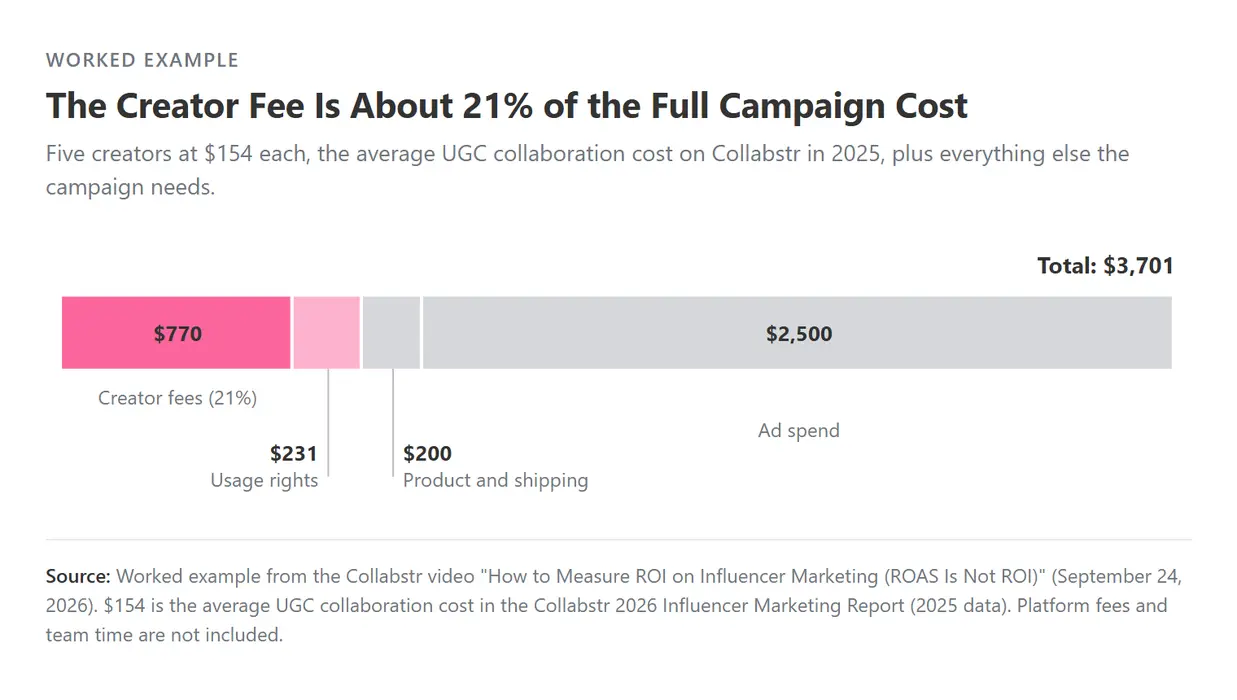
The $770 in creator fees is about 21% of the total. Divide revenue by $770 and you get a big number that will not survive questions. Divide by $3,701 and you get one that will.
To match the video, the example leaves out platform fees and your team's time. Add both to your own cost total.
Step 2: Track Each Order Once
Next, work out which sales came from which creator. Use two tools, because each catches what the other misses:
• A tracking link lets your analytics see clicks from the post. It misses the person who watches today and searches for you tomorrow.
• A creator code catches the person who hears it in the video and uses it at checkout later. It can leak onto coupon sites.
Add one question at checkout, "How did you hear about us?", to catch what both miss. Our guide to influencer discount codes covers code setup.
Then count each order once. If the link shows 40 orders and the code shows 65, match them at the order level. If the 40 linked orders already sit inside the 65 coded orders, you have 65 unique orders, not 105. On Collabstr, you can put the tracking link and the creator code into the order itself, so each creator starts with their own tracking from day one (Collabstr video, 2026).
Step 3: Take Product Costs Out
Now calculate the return. Say the campaign brings in $10,000 in revenue on $3,701 of cost, and 40 cents of every dollar goes to making and shipping the product, a 60% margin.
|
Measure |
Calculation |
Result |
|---|---|---|
|
ROAS |
$10,000 ÷ $3,701 |
2.7x |
|
Return before product costs |
($10,000 − $3,701) ÷ $3,701 |
170% |
|
Gross profit |
$10,000 × 60% |
$6,000 |
|
Profit after campaign cost |
$6,000 − $3,701 |
$2,299 |
|
ROI |
$2,299 ÷ $3,701 |
62% |
Worked example from the video.
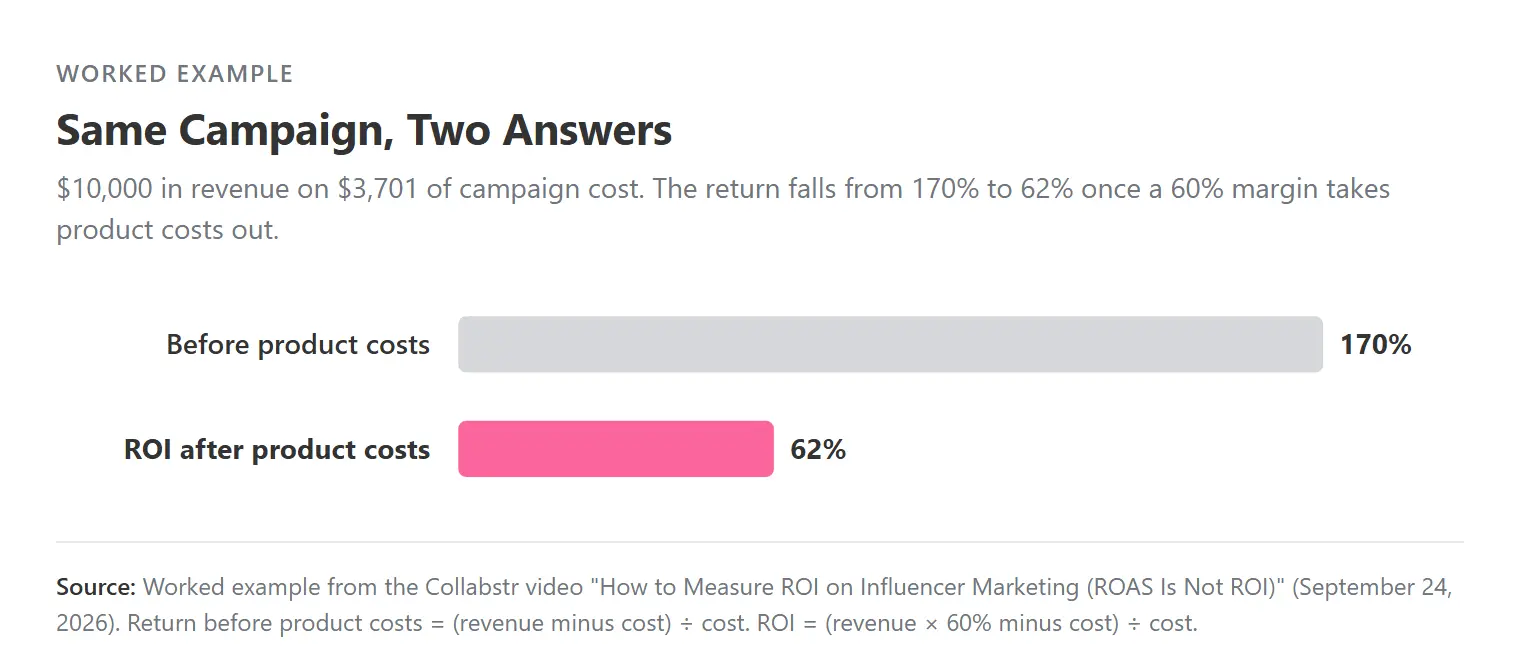
Report both numbers, labeled, and show your math so finance can see how you got there.
A quick check links the two metrics. A campaign makes a profit only when ROAS is higher than 1 ÷ margin. At a 60% margin, break-even is 1 ÷ 0.6, a ROAS of about 1.67. This campaign's 2.7 clears it, so the ROI is positive. At a 30% margin, break-even rises to about 3.33, and the same 2.7 ROAS would lose money.
Report It Creator by Creator
A campaign total hides the creators who carried it. Put the delivery numbers on the left and your orders, revenue and profit on the right, one row per creator. Here is the same $3,701 campaign split evenly across five creators:
|
Creator |
Cost |
Views |
Orders |
Revenue |
Profit after product costs |
ROI |
|---|---|---|---|---|---|---|
|
Creator 1 |
$740 |
31,000 |
31 |
$3,100 |
$1,120 |
151% |
|
Creator 2 |
$740 |
12,500 |
9 |
$900 |
−$200 |
−27% |
|
Creator 3 |
$740 |
22,000 |
26 |
$2,600 |
$820 |
111% |
|
Creator 4 |
$740 |
8,400 |
14 |
$1,400 |
$100 |
13% |
|
Creator 5 |
$740 |
18,600 |
20 |
$2,000 |
$460 |
62% |
|
Total |
$3,701 |
92,500 |
100 |
$10,000 |
$2,299 |
62% |
Worked example. Cost is $740.20 per creator; profit is revenue × 60% minus cost. Rounded.
The total says 62%. The rows say two creators earned most of it, one lost money and one barely covered its cost. That is the page a finance team can sign off on, and the one that tells you who to rebook. Our influencer marketing reporting guide has a template.
What the Campaign Caused: Incrementality Testing
Once spend gets meaningful, a harder question follows: how many of those sales happened because of the campaign? Links and codes show who bought after seeing a creator. They cannot show whether that customer would have bought anyway.
To answer it, you need a test. Incrementality testing compares a group that saw the campaign with a similar group that did not. One version is regional: run the campaign in one region and use a similar region as your comparison. The difference in sales between the two is what the campaign created.
Here is why it matters, in the video's second worked example:
|
Counting every attributed sale |
Counting only new sales |
|
|---|---|---|
|
Campaign cost |
$7,600 |
$7,600 |
|
Revenue counted |
$18,000 |
$12,600 (70% of sales were new) |
|
Profit at a 50% margin |
$1,400 |
−$1,300 |
|
ROI |
18% |
−17% |
Worked example from the video: 12 Instagram creators, $7,600 all in.
Same campaign, two conclusions: an 18% ROI if you count every attributed sale, or a −17% ROI if you count only new sales. A regional test takes time and a second region to compare, so it is worth it once the spend is large enough for that answer to change your decision. Before you scale to meaningful spend, have this answer ready, because a CFO is likely to ask. The test is yours to run, since it uses your own sales data by region.
Three Habits That Keep the Numbers Clean
1. Keep earned media value separate. Some tools give you an earned media value, an estimate of what the exposure would have cost as ads. It is not revenue, so report it on its own line. See our guide to earned media value.
2. Fix your attribution window. Decide how long after a post you still count a sale. An impulse buy can convert in a day; a bigger purchase can take weeks. Pick a window that fits the product and keep it.
3. Judge creators individually. Rebook the ones that meet your target, retest strong content when the tracking was weak, and drop the ones that consistently miss.
What These Numbers Can and Cannot Tell You
Every return in this article is a worked example. Your margin, ad spend and order value will move the results a long way, which is the point: the formula matters more than any benchmark. The $154 creator fee is hypothetical, and your creators may cost more or less.
Tracked orders can be too low or high. Links miss people who come back later, codes pick up people who found the code elsewhere, and a regional test has its own noise if the regions differ in ways you did not plan for. Report the method alongside the number.

What This Means for Brands
Lead with what the campaign drove, reported as ROI on the full cost, with ROAS beside it and the math shown. Keep the delivery numbers as the record of what each creator delivered, and have the incrementality answer ready before you scale. Collabstr tracks the delivery side for the posts on your plan's live tracking, so the first question is covered when it is time to build the report. For more ways to measure, see how to measure influencer marketing ROI, and for how much to pay in the first place, watch How Much Should You Pay an Influencer?.
FAQ
What Is the Difference Between ROAS and ROI?
ROAS is revenue divided by spend, and shows how much money came back for each dollar spent. ROI is profit divided by spend, so it also subtracts what the product cost to make and ship. In the worked example, the same campaign has a ROAS of 2.7x and an ROI of 62%.
Is a High ROAS Always Profitable?
No. A campaign is profitable only when ROAS is higher than 1 ÷ your margin. At a 60% margin, break-even ROAS is about 1.67. At a 30% margin, it is about 3.33, so a 2.7 ROAS would lose money.
How Do You Calculate Influencer Marketing ROI?
Add up the full campaign cost, including creator fees, usage rights, product, shipping, ad spend and platform fees. Count each order once, multiply revenue by your margin, subtract the full cost, and divide the result by the full cost.
What Is Incrementality Testing in Influencer Marketing?
Incrementality testing compares sales in a group that saw the campaign with a similar group that did not, to measure the sales the campaign created. A simple version runs the campaign in one region and uses a similar region as the comparison.
Should You Include Earned Media Value in ROI?
No. Earned media value estimates what the exposure would have cost as ads. It is not money the campaign brought in, so report it separately from revenue and ROI.
Methodology
• Creator fee ($154): a hypothetical rate chosen for the worked example.
• Tracked metrics, 24-hour refresh, plan limits and three-week tracking window: Collabstr's Track and Report page and pricing page, read October 14, 2026.
• Tracking link and code in the order: stated by Collabstr in the video "How to Measure ROI on Influencer Marketing (ROAS Is Not ROI)," published September 23, 2026.
• Worked examples ($3,701 campaign, $10,000 revenue, 60% margin; 40 and 65 orders; 12 creators, $7,600, $18,000, 50% margin, 70% incremental): illustrative figures from the video, recomputed for this article. The five-creator table and the break-even ROAS check are our own illustrations on the same numbers.
• ROI here means profit after product costs and campaign cost, divided by campaign cost. ROAS means revenue divided by campaign cost.